OPENPUBLICA · PUBLIC MEETING RECORD
Record of Proceedings
Gulfport City Council Meeting - October 07, 2025
City Council — Tuesday, October 7, 2025
BodyGulfport, Florida
SessionCity Council
DateTuesday, October 7, 2025
StatusFILED
Video Record
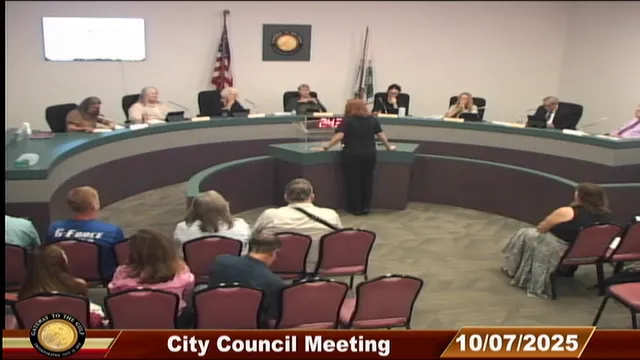
STREAMING COPY IN PREPARATION — RECORDING AVAILABLE FROM THE ORIGINAL SOURCE
Transcript — Verbatim
Speaker numbers apply only to this recording. Names come from transcript evidence. “Possibly” marks uncertain attribution.
Discussion Breakdown — Share of Meeting
Community Events17%
Public Engagement13%
Volunteer Management10%
Community Engagement6%
Procedural5%
Website Management5%
Permitting and Inspections5%
Public Transportation5%
Parking Management4%
Summary of Proceedings
Gulfport City Council Meeting - October 7, 2025
The Gulfport City Council held its regular meeting on October 7, 2025 at City Hall. The agenda included presentations on a new volunteer management software and a redesigned city website, the adoption of consent items and several resolutions, and public hearings. Key actions included passing an ordinance regulating cooking while parked, approving the fiscal year 2025-2026 special events calendar, and reaching a consensus on fees for electric vehicle charging stations. The Council also addressed parking management strategies and provided updates on various city projects.
Presentations
- Get Connected Volunteer Software: Assistant City Manager David Mather introduced "Gulfport Connects," a platform to connect residents with volunteer opportunities from the city and local non-profits. It allows users to track hours for grant in-kind contributions, manage volunteer qualifications, and can be used for emergency response coordination. The platform is now live.
- New Website Enhancements: Mr. Mather showcased the redesigned city website featuring cleaner menus, an AI-powered FAQ agent, a comprehensive form library, and a mobile-responsive design aimed at meeting upcoming ADA compliance standards.
- Council Discussion: Council members asked questions about social media integration for events, skill-based volunteer matching, and the ADA compliance road map.
Consent Calendar
All items on the consent calendar were approved unanimously, including:
- Holiday decoration services agreement with Rileighs Outdoor LLC dba Clark Sales Display (Resolution 2025-72)
- Authorization to purchase library materials via state contract (Resolution 2025-73)
- Purchase of IT products and services from SHI (Resolution 2025-74)
- Payment authorization for Tech Guru Consulting IT managed services (Resolution 2025-75)
- Funding for Granicus platforms for FY 2025-2026 (Resolution 2025-76)
- Annual maintenance fee payment to Tyler Technologies (Resolution 2025-77)
- Agreement with PSD Citywide Inc. for Public Works asset management software (Resolution 2025-78)
- Contract with Todd’s Air Conditioning for HVAC replacement at the Yakes Rec Center (Resolution 2025-79)
- Approval of the September 16, 2025 meeting minutes.
Public Comments & Testimony
- Bonnie Bray proposed the city explore focus groups for golf cart regulation reassessment, a dog beach on Shore Boulevard, and converting 54th and 56th Streets to one-way. She also requested stop signs on Beach Boulevard.
- Wolfgang Dininger (Gulfport Grassroots) reported 49 participants removed 180 pounds of trash during the Clam Bayou cleanup. He strongly criticized the lack of enforcement of no-parking laws on sidewalks, stating it creates a major hazard for people with disabilities.
- Amy Costa (Midtown Business Collective) invited the community to a business mingle and offered to host public focus groups. She detailed plans for a “Hurricane Healing” day and a community-wide Halloween “Creepy Crawl.”
- Eileen Corning (Gulfport Senior Center Foundation) expressed gratitude for city support, highlighting the new volunteer software platform and the Foundation’s growth.
- Carol Kelly (New Horizons Band) thanked the city for performance space, emphasizing the importance of free community concerts.
- Courtney Prokopis (Gulfport Coastline Coalition) announced the availability of “No Wake Zone” yard signs. She inquired about the living shoreline project’s status and whether the new C Click Fix app would be public-facing. She voiced support for the One Community Grocery Co-op.
- Karen Schwartz thanked Public Works for installing bike racks at the rec center and suggested a website or app feature to request new bike rack locations.
- Katie (Shore Boulevard) advocated for the city to actively promote the beach water quality, stating it is now clean and safe.
- Scott Reevy (4th Ward) expressed frustration with permitting roadblocks when renovating a property for a mixed-use business. He supported evaluating traffic flow and parking solutions.
- Korea (Gulfport Food Forest) reported a successful inaugural fundraiser with over 300 attendees and announced new board members. She recommended the “Effortless City” mapping service for accessibility.
- Bill Griffo (Gulfport Senior Center Foundation) detailed upcoming fundraising events, including a Health & Wellness Expo and Night in Italy.
- Bob Canning (Shore Boulevard) requested a status update on the stormwater flood study.
Discussion Items
- City Manager Report:
- Permitting Update: 104 notices of violation for unpermitted work were sent to maintain NFIP compliance; 37 responses have been received and 35 demolition permits issued. A second round of letters covering approximately 300 more properties is pending.
- EV Charging Fees: Staff proposed instituting fees to offset $1,100/month costs. Council discussed rates and reached a consensus on 30 cents per kilowatt-hour plus a $5-per-hour idle fee. A formal resolution will be drafted.
- Ordinance 2025-11 (Cooking while Parked): During the second reading and public hearing, several commenters expressed concern over unclear definitions of “cooking” and “parking.” Despite this, the Council voted 5-0 to approve the ordinance.
- Special Events Resolutions (8A, 8B, 8C): Justin presented the 2025-2026 event calendar. Council discussed the shift of the holiday parade to a daytime community event, the cancellation of the Pride Festival (with a new Pride Market scheduled for February), and the waiver of theater fees for the Gulfport Community Players. All three resolutions were approved 5-0.
- New Business:
- Downtown Parking Management: Vice Mayor Thanos proposed a bike rack inventory, better trolley signage, and modifying resident-only parking for employees. Councilmember Earley expressed a desire for further discussion before implementing specific changes. Mayor Love confirmed staff is already collecting data on employee parking needs. Council agreed to hold a dedicated discussion before the end of 2025.
- Stormwater Study: The report is scheduled for presentation to Council on November 18, 2025.
- Youth Mock Council: Councilmember Shaw’s proposal for a youth mock council meeting received Council consensus to proceed.
- Lincoln Cemetery Update: Mayor Love provided an update from an accidental meeting with Corey Givens and a subsequent call with Pastor Williams, who she stated does not support the negative public narrative against the city and clarified the city is not the property owner.
Key Outcomes
- Ordinance 2025-11 (Cooking while Parked): Approved (5-0).
- Special Events Resolutions: Resolutions 2025-80 (New Events), 2025-81 (Recurring Events), and 2025-82 (Multiday Events) all passed (5-0).
- Submersible Pump Purchase: Resolution 2025-83 for Lift Station #2 passed (5-0).
- Mental Health Services: Resolution 2025-84 renewing the Directions for Living contract passed (5-0).
- EV Charging Fee Schedule: Council reached a consensus to implement a $0.30/kWh charge and a $5/hr idle fee. A formal resolution will be brought to the next meeting.
- Stormwater Study Presentation Date: The study will be presented to Council on November 18, 2025.
- Future Parking Discussion: Council scheduled a discussion to take place before the end of 2025 to address downtown parking regulations.
- Youth Mock Council: Council agreed to organize a youth mock council meeting.
Meeting Transcript
Good evening. Good evening and welcome to the October 7th, 2025 City Council meeting. Thanks for coming. If there's any chance that you have your phone on, take a minute, check it, turn it off. I appreciate that. And with that being said, we will uh start with the invocation given by given by Councilmember Nancy Early, followed by the Pledge of Allegiance. So please uh rise. For those of you who are still in the coal mines like myself, you know that it's employee appreciation week, formerly known as Customer Service Week. So this is for our city staff. We must find time to stop and thank the people who make a difference in our lives. Okay, thank you, Mayor City Council. First, I'm going to start. This is Gulfport Connects. Um, this is what it will look like when you go on. What it is is um it's a way to uh have volunteers connect with not only the city for volunteer opportunities, but also for uh organizations within the city for volunteer opportunities. So um I'm not gonna go into the weeds, obviously, but I'm going to show you all the things you can do first as a volunteer and secondly as an organization. So if I'm a volunteer, what I'm gonna do is I'm gonna log in here. And I would have had this done before, but it kicked me out, kept kicking me out, so couldn't do it. Okay, so this is what you will come to if you are a volunteer. And the first thing you'll notice is I've obviously already made an account. You have to make an account first. Um, but that's just like making an account anywhere, you just have to put your name. Uh you know, you don't have to do anything really any heavy lifting at first, you just have to put your name, email address, and make a password. And you'll come to this screen and it'll tell you, you know, sign up for volunteer opportunities, browse agencies, or RSVP to an event. So if I wanted to go to an opportunity, I'm gonna click here, and we do have two for the city in the system currently. We have a volunteer shelver at the library and a welcome and ambassador for the senior center. Um, we do have some groups in here too, they're still going through training, but the uh we have uh you can browse agencies, and these are all the current ones that we have. We have Gulfport Grassroots, the City, the Lions Club, the Library, uh Gulfport Recovers, Gulfport Merchants, Gulfport Senior Center, Gulfport Senior Center Foundation, and the Midtown Business Collective. So they're all in here and kind of like a Facebook kind of thing, you can become a fan of them. So if they do have uh opportunities that come up later, you can click on that, or let's say you didn't know what Gulfport Recovers was, you could click on that information to get more information. Um, the next thing over the uh RSVP to an event. Uh, there is an organization that has an event in here. So let's say you wanted to, you were knew you were gonna go to this event and perhaps volunteer for this event, you could click on that. Um so that is the uh what you'll see from as a volunteer. Now, if you go down, you'll see this again because it's it's redundant on purpose. Some people like to scroll, and this is by design, this is the way the company created this, but some people like to scroll. Uh, some other things you can do as of uh you can also click on needs, obviously, and you'll see those same needs because we have two right now in there, and obviously this will be once the community groups start adding, there'll be more added here. But the other neat thing is as a volunteer anyway, you can click on as a volunteer and add your hours. So, right now, if I go to this on my dashboard, if I click out of here, you'll see uh obviously I've been a really bad volunteer because I have no volunteer hours here. But um, if I had volunteer hours, they would show up here. It's also gonna show the impact. So if the organization you this is really good for grants, if an organization that you are part of uh puts in a dollar value according to like what the federal government says that particular volunteer is worth, you can actually add that up here, and so if you have several volunteers and you're going for a grant, you can actually list that as in-kind services. So that's a good thing to have. You can also as an well, I'll show you as an organization later. So I'm still a volunteer here. So here's how many agencies I've worked for and events I've gone to, uh things like that, and how many needs I've responded to.
SUMMARIZED BY OPENPUBLICA AI
TRANSCRIPT VIA PUBLIC VIDEO
openpublica.com
openpublica.com