City Staff Training on Live Manager and Legistar Minutes Processing - February 12, 2025
STREAMING COPY IN PREPARATION — RECORDING AVAILABLE FROM THE ORIGINAL SOURCE
City Staff Training on Live Manager and Legistar Minutes Processing - February 12, 2025
On February 12, 2025, a training session was conducted by Granicus trainer Lauren for city staff (Tiff, Natalia, and others) focusing on using Live Manager and Legistar for taking minutes, handling consent votes, and processing agenda items. The session lasted from approximately 11:15 AM to 2:30 PM and included live demonstrations, Q&A, and discussions on workflow improvements.
Discussion Items
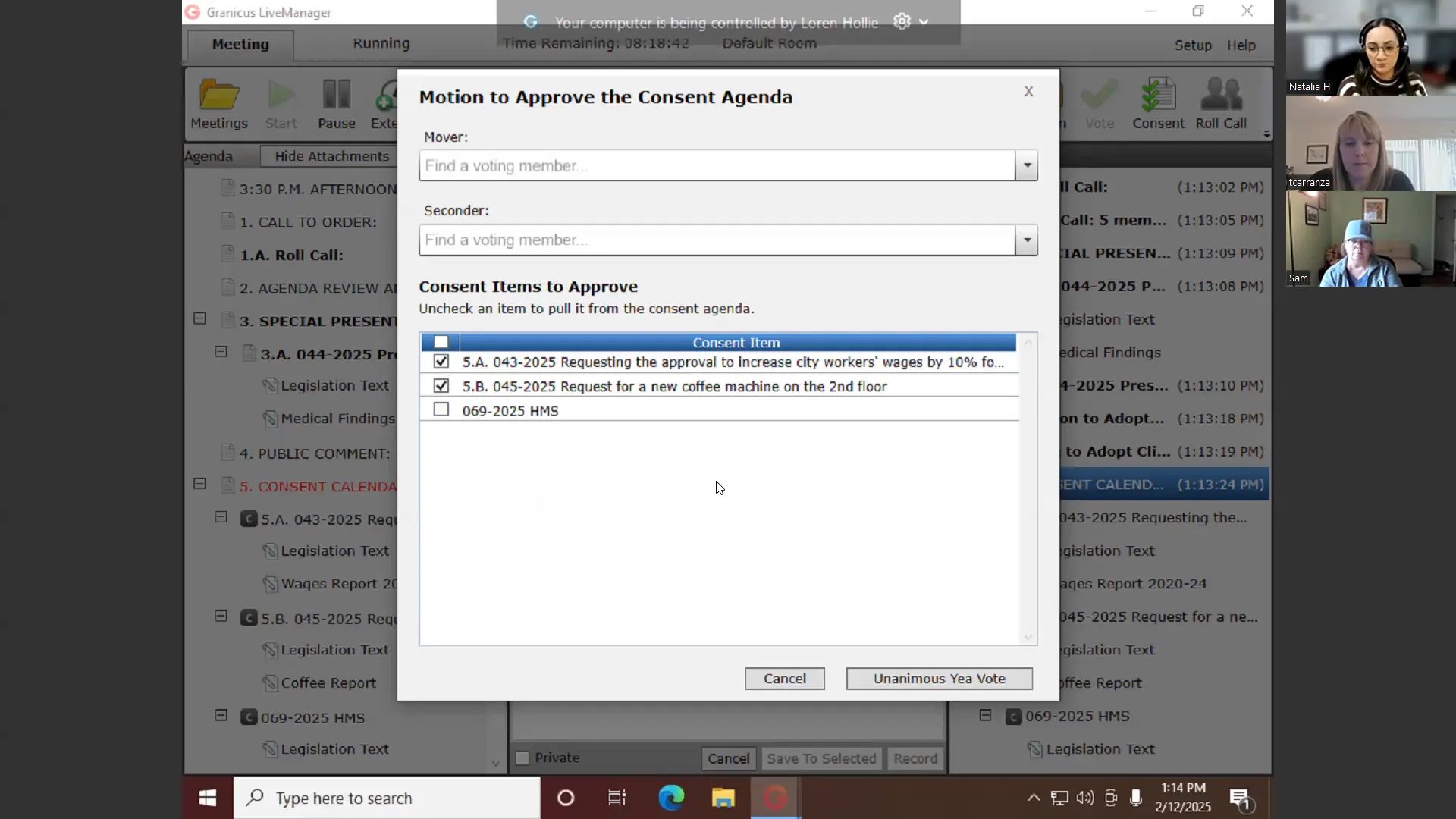
- Live Manager Demonstration: Lauren walked through opening Live Manager, loading meetings, timestamping agenda items, taking roll call, recording motions and votes, and using the consent vote button. Staff learned how to mark items as consent in Legistar (via minutes tab) before the meeting, then use the consent button in Live Manager to approve them with a unanimous vote.
- Importing Data from Live Manager to Legistar: After the meeting, staff can import data (timestamps, motions, votes) into Legistar minutes. Lauren demonstrated using the 'import data' tool under the Tools menu, then verifying roll call, motion text, and votes in the Actions tab.
- Handling Multiple Motions on One Item: Staff asked how to record multiple motions and votes on a single agenda item (e.g., first a motion to amend, then to approve as amended). Lauren showed how to copy the file line and record separate motions and votes, resulting in two entries in the minutes. An alternative using 'Adopted as Amended' action was also discussed.
- Standard Paragraphs in Legistar: Staff learned how to access and update pre-written text (standard paragraphs) for common minute entries (e.g., call to order, adjournment). Lauren navigated to Workflow Options > Standard Paragraphs in the admin area.
- Troubleshooting Consent Vote Errors: Tiff reported occasional issues where consent vote actions do not stick in Legistar. Lauren suggested it may be due to missing standard actions for certain file types or system lag; advised capturing a screen recording and contacting support.
- Using Granicus University and Send Agenda Feature: Staff expressed interest in navigating Granicus University for self-training and learning about the 'Send Agenda' feature for automatic email distribution. Lauren offered to send a welcome video and noted that Send Agenda is free and can be set up via Brian (project manager).
- Disclosure Docs (Transparency) Issues: Staff raised concerns about the support structure for Disclosure Docs (Form 700). Lauren recommended contacting their success consultant Mariana for advocacy and using the GovRecords virtual assistant on the support portal.
Key Outcomes
- Staff will begin using the consent vote button in Live Manager for future meetings after marking consent items in Legistar beforehand.
- Staff will update their standard paragraphs in Legistar (e.g., changing old clerk's signature line) using the Workflow Options menu.
- A follow-up call is scheduled for Friday, February 14, 2025, to cover Granicus University navigation and any remaining questions.
- Lauren will send an email to Brian regarding updates to the Insight page (HTML agenda columns) and interest in the Send Agenda feature.
- Staff will contact Mariana for Disclosure Docs support and may submit a support case via GovRecords virtual assistant.
Meeting Transcript
All right. Welcome back, team. As you can see, I currently have your encoder open because today, before we start talking about minutes, we're gonna take a quick little detour and take a look at Live Manager. Now, should we see it, Lauren? I don't see um Do you not see my screen? I see a we see a blue screen. Oh yeah, yeah. Yeah, I haven't opened up Live Manager yet, but this is you guys' encoder. This this background is is not a Lauren background. You guys know I'm more colorful than that. So here with your encoder open. I'm gonna go ahead and open up Live Manager. Um hopefully we won't have any troubles. Now, question for you guys. When you guys normally open Live Manager, do you do it directly from your encoder? Or do you have like a computer that has like access in like chambers or something like that? We have a I'm not sure what you mean by encoder. We we have a Alexa Stalin. Sorry. Um that was from Mateo's COVID test, which was positive before it even started. Um we have the desktop, like you like that little or like little green desktop shortcut on our computer in the chambers that we launch from. Gotcha. Hold on just a second. And I think and I think I have it on my, I feel like I have it on my desktop too. Um I do. I have a live manager shortcut on my desktop. I don't think you guys have dated to Edge on this computer. I don't know. I don't know. Um we use Edge, we use Edge from like in our chamber. That's the like default. Yeah, it looks like you guys might still have Explorer. Can you can you launch Live Manager from your computer, Tiff? Um, I'm not I can try. Hold on a second. Okay. I don't know. Um wait, no, you're not you're not in, you're not on the same. Do you have a VPN or something? Mine's I don't listen. I'm not in IT, Lauren. Um, but I can hold on. I let me share my screen so I can okay. Let me unshare. Oh yeah. Okay, go ahead. Okay, so which is this me? Tell me. Um can you see it? I can see your screen.
openpublica.com